Use mymueller® now for your Helpdesk Inquiries

Use mymueller® now for your Helpdesk Inquiries

Extbase Variable Dump
Stilgrenze\Stgnewsext\Domain\Model\StilgrenzeNewsFieldModelDefaultprototypepersistent entity (uid=46, pid=63)
isEvent => protected'0' (1 chars)
startEvent => protected'0' (1 chars)
endEvent => protected'0' (1 chars)
locationEvent => protected'' (0 chars)
isDownload => protected'0' (1 chars)
eventWithRegistration => protected'0' (1 chars)
headerimage => protectedNULL
countryOutput => protected0 (integer)
crdate => protectedDateTimeprototypeobject (2021-04-28T14:39:46+02:00, 1619613586)
tstamp => protectedDateTimeprototypeobject (2021-08-20T13:23:19+02:00, 1629458599)
sysLanguageUid => protected0 (integer)
l10nParent => protected0 (integer)
starttime => protectedNULL
endtime => protectedNULL
feGroup => protected'' (0 chars)
hidden => protectedFALSE
deleted => protectedFALSE
title => protected'Use mymueller® now for your Helpdesk Inquiries' (46 chars)
alternativeTitle => protected'' (0 chars)
teaser => protected'' (0 chars)
bodytext => protected'<p>With the new release of our service-portal mymueller® contacting our help
 desk is now made even easier. You can register your service enquiries conven
 iently via mymueller® by simply clicking on the title “Service Request” on t
 he new HELPDESK tile. This will open a form in which you can enter all the r
 elevant facts to your request. Uploading data such as photographs, videos, e
 tc. is also possible. This will ensure that our employees receive all the ke
 y information for your request right from the start, preventing unnecessary
 callbacks and therefore avoiding delays.</p> <p>In your portal environment,
  you can always find an overview of your current inquiries as well as the ac
 tual status of each one of them by clicking on the title “Tickets” on the HE
 LPDESK tile.</p>
' (776 chars)
datetime => protectedDateTimeprototypeobject (2021-04-20T14:39:00+02:00, 1618922340)
archive => protectedNULL
author => protected'' (0 chars)
authorEmail => protected'' (0 chars)
categories => protectedTYPO3\CMS\Extbase\Persistence\Generic\LazyObjectStorageprototypeobject (1 items)
00000000000043f30000000000000000 => GeorgRinger\News\Domain\Model\Categoryprototypepersistent entity (uid=1, pid=64)
sorting => protected768 (integer)
crdate => protectedDateTimeprototypeobject (2021-03-15T09:21:43+01:00, 1615796503)
tstamp => protectedDateTimeprototypeobject (2021-03-15T09:21:43+01:00, 1615796503)
starttime => protectedNULL
endtime => protectedNULL
hidden => protectedFALSE
sysLanguageUid => protected0 (integer)
l10nParent => protected0 (integer)
title => protected'News' (4 chars)
description => protected'' (0 chars)
parentcategory => protectedNULL
images => protectedTYPO3\CMS\Extbase\Persistence\Generic\LazyObjectStorageprototypeobject (empty)
shortcut => protected0 (integer)
singlePid => protected0 (integer)
importId => protected'' (0 chars)
importSource => protected'' (0 chars)
feGroup => protected'' (0 chars)
seoTitle => protected'' (0 chars)
seoDescription => protected'' (0 chars)
seoHeadline => protected'' (0 chars)
seoText => protected'' (0 chars)
slug => protected'news' (4 chars)
uid => protected1 (integer)
_localizedUid => protectedmodified1 (integer)
_languageUid => protectedmodified0 (integer)
_versionedUid => protectedmodified1 (integer)
pid => protected64 (integer)
related => protectedTYPO3\CMS\Extbase\Persistence\Generic\LazyObjectStorageprototypeobject (empty)
relatedFrom => protectedTYPO3\CMS\Extbase\Persistence\Generic\LazyObjectStorageprototypeobject (empty)
falRelatedFiles => protectedTYPO3\CMS\Extbase\Persistence\Generic\LazyObjectStorageprototypeobject (empty)
relatedLinks => protectedTYPO3\CMS\Extbase\Persistence\Generic\LazyObjectStorageprototypeobject (empty)
sortingForeign => protectedNULL
type => protected'0' (1 chars)
keywords => protected'' (0 chars)
description => protected'' (0 chars)
falMedia => protectedTYPO3\CMS\Extbase\Persistence\Generic\LazyObjectStorageprototypeobject (1 items)
000000000000451a0000000000000000 => GeorgRinger\News\Domain\Model\FileReferenceprototypepersistent entity (uid=2523, pid=63)
title => protected'' (0 chars)
description => protected'' (0 chars)
alternative => protected'' (0 chars)
link => protected'' (0 chars)
showinpreview => protected1 (integer)
uidLocal => protected930 (integer)
originalResource => protectedNULL
uid => protected2523 (integer)
_localizedUid => protectedmodified2523 (integer)
_languageUid => protectedmodified0 (integer)
_versionedUid => protectedmodified2523 (integer)
pid => protected63 (integer)
falMediaPreviews => protectedNULL
falMediaNonPreviews => protectedNULL
internalurl => protected'' (0 chars)
externalurl => protected'' (0 chars)
istopnews => protectedFALSE
contentElements => protectedTYPO3\CMS\Extbase\Persistence\Generic\LazyObjectStorageprototypeobject (empty)
tags => protectedTYPO3\CMS\Extbase\Persistence\Generic\LazyObjectStorageprototypeobject (empty)
pathSegment => protected'use-mymuellerr-now-for-your-helpdesk-inquiries' (46 chars)
editlock => protected0 (integer)
importId => protected'' (0 chars)
importSource => protected'' (0 chars)
sorting => protected0 (integer)
notes => protected'' (0 chars)
uid => protected46 (integer)
_localizedUid => protectedmodified46 (integer)
_languageUid => protectedmodified0 (integer)
_versionedUid => protectedmodified46 (integer)
pid => protected63 (integer)

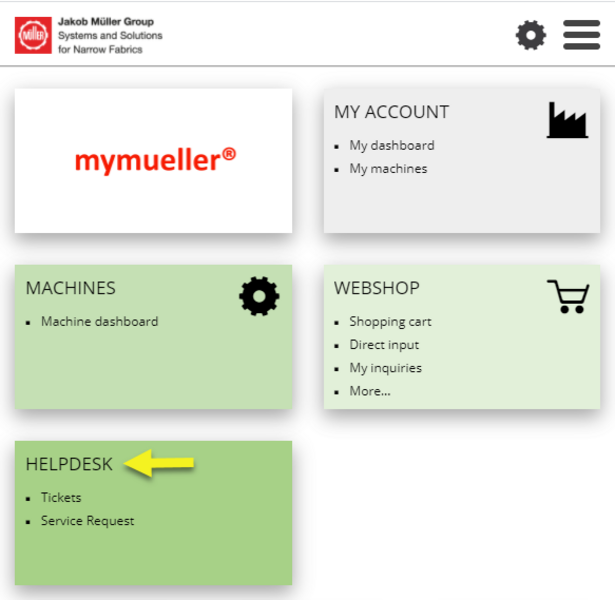
With the new release of our service-portal mymueller® contacting our helpdesk is now made even easier. You can register your service enquiries conveniently via mymueller® by simply clicking on the title “Service Request” on the new HELPDESK tile. This will open a form in which you can enter all the relevant facts to your request. Uploading data such as photographs, videos, etc. is also possible. This will ensure that our employees receive all the key information for your request right from the start, preventing unnecessary callbacks and therefore avoiding delays.

In your portal environment, you can always find an overview of your current inquiries as well as the actual status of each one of them by clicking on the title “Tickets” on the HELPDESK tile.